Microsoft Customer Agreement billing model
Contract overview
- The Microsoft Customer Agreement (MCA) is the modern Azure commerce platform that delivers the same enterprise-grade billing foundation as legacy Enterprise Agreements while simplifying contracting and ongoing administration.
- It's anchored to a single Microsoft Entra tenant, but billing owners can associate additional tenants and link subscriptions across directories without changing their resource tenancy.
Why ISVs move from pay-as-you-go to MCA
- Pay-as-you-go subscriptions invoice separately, each with its own payment method, which forces you to manage multiple credit cards for production workloads at scale.
- MCA consolidates subscriptions under a single invoice payable via wire transfer or ACH, removing the need to attach credit cards to individual subscriptions.
- MCA for enterprise supports up to 10,000 subscriptions under a single billing account, while pay-as-you-go limits you to 5 subscriptions per account.
Billing hierarchy
- The MCA billing hierarchy flows from the billing account to billing profiles, invoice sections, and down to subscriptions, as illustrated in the official diagram below. You'll see the scopes you need to automate clearly labeled in that reference image.
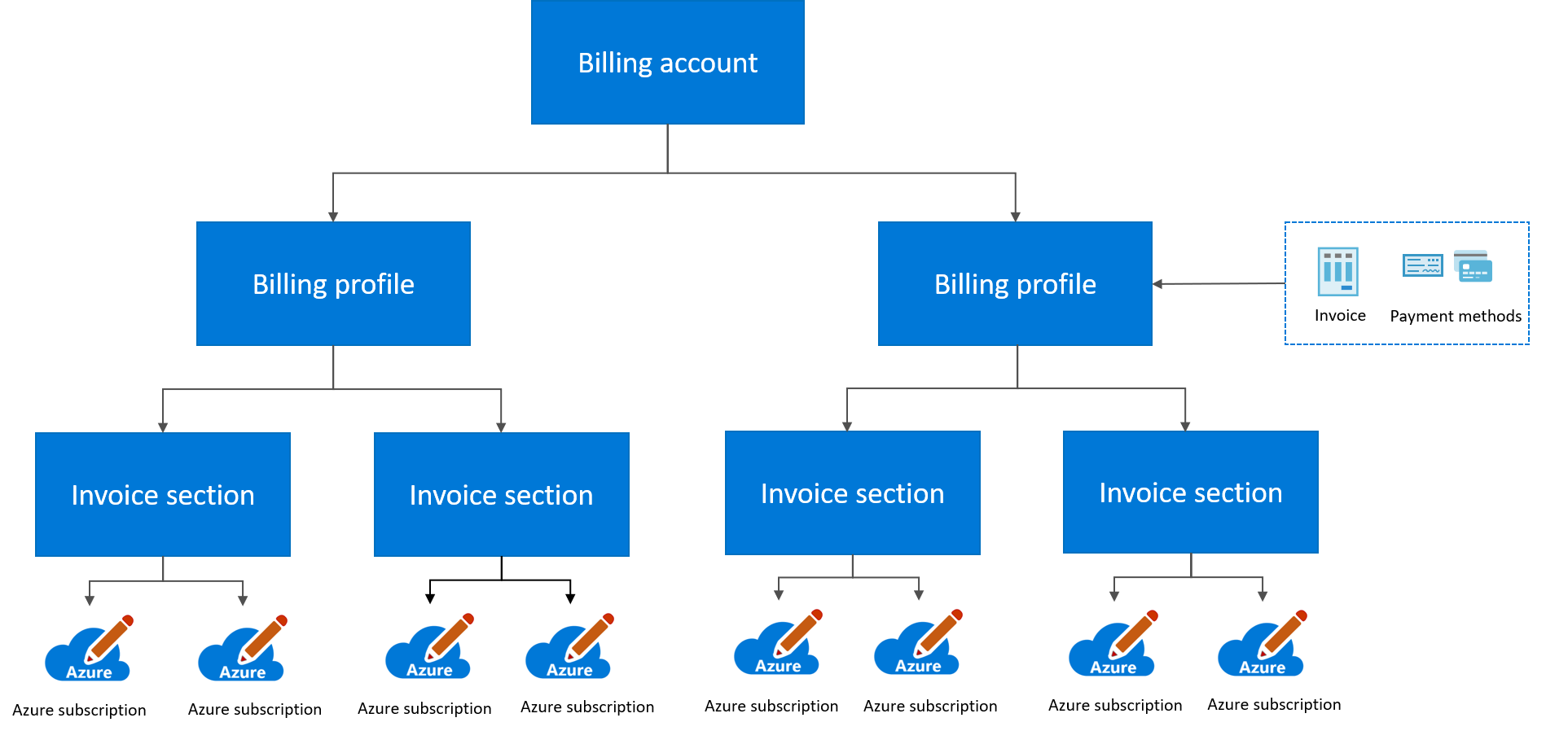
Structuring costs with billing profiles and invoice sections
- Billing profiles correspond to individual invoices and payment methods. Each invoice section under a billing profile groups the charges that appear on that invoice, giving fine-grained cost segmentation for departments, environments, or projects.
- Billing profile owners or contributors can create additional invoice sections directly in Cost Management + Billing to mirror the organization's cost centers or workload boundaries.
- Billing profiles also define the shared scope boundary for Azure Reservations and Savings Plans in an MCA, so shared benefits only apply to eligible subscriptions that stay within the same billing profile context.
Automation and service principals
- Any automation account or pipeline that needs to create subscriptions must hold the Azure subscription creator role (or owner/contributor) on the target invoice section, billing profile, or billing account—otherwise it can't submit alias requests successfully.
- Microsoft's subscription-request workflow allows selecting a service principal as the subscription owner by pasting its App (client) ID, confirming that service principals are first-class identities for billing operations.
- To onboard a service principal for subscription creation:
- Ensure the service principal exists in the Microsoft Entra tenant associated with the billing account (or an associated tenant).
- Assign the service principal the Azure subscription creator role on the desired invoice section so it can create subscriptions under that scope. The official guidance explicitly notes that the same billing roles can be granted to service principals.
- When triggering a subscription request or calling the subscription-creation APIs, use the service principal's object ID/App ID; the portal experience accepts the value when you add it as a subscription owner.
Multi-tenant considerations
- Billing owners can create subscriptions in any tenant they have associated with the MCA billing account, and they can transfer billing ownership of existing subscriptions without moving the underlying resources.
- Guest users or associated tenants can be granted billing roles so finance teams in other directories can manage invoice sections or run automation without duplicating subscriptions.
Rate optimization through commitments
MACC (Microsoft Azure Consumption Commitment)
- A Microsoft Azure Consumption Commitment (MACC) is a contractual commitment to spend a specific amount on Azure over a defined period.
- Eligible Azure services and Marketplace purchases automatically count toward fulfillment, and you don't need to manually track which resources apply; however, not all Azure Marketplace purchases count toward MACC—verify eligibility for third-party offerings.
- You can track your MACC progress directly in the Azure portal under Cost Management + Billing.
ACD (Azure Commitment Discount)
- Azure Commitment Discount (ACD) is a negotiated percentage discount on pay-as-you-go rates for customers with a MACC agreement.
- The discount percentage isn't fixed—it's negotiated as part of your agreement.
- When you purchase a Savings Plan, Azure automatically applies whichever discount is better—the ACD rate or the Savings Plan rate—so you always get the optimal price.
Negotiated pricing
- Organizations can negotiate discounts on their customer price sheet, which sets custom rates for specific Azure services.
- Reservation prices can be negotiated separately from ACD, and ACD doesn't stack on top of reservations—reservations have their own negotiated rates.
Visibility through FinOps Hubs
- Use FinOps Hubs to monitor commitment discount utilization and realized savings across your estate; FinOps Hubs requires deployment before queries are available.
- The rate optimization capability in the FinOps Framework provides guidance on when to use reservations versus savings plans based on workload stability.
- FinOps Hubs exposes commitment tracking queries documented in the FinOps Toolkit query index.
Capacity allocation as a rate optimization signal
Capacity reservations and quota staging signal when to evaluate rate optimization purchases.
Warning: Use Cost Management + Billing for enterprise-wide reservation recommendations. Azure Advisor rightsizing and shutdown recommendations use retail (pay-as-you-go) prices, not your negotiated rates. Advisor's reservation recommendations do use negotiated pricing, but Advisor is limited to single-subscription scope. Cost Management + Billing reservation recommendations see all VMs across your billing account and use your negotiated price sheet. Navigate to Reservations > Add in Cost Management + Billing to get accurate, estate-wide savings estimates.
Review usage before purchasing:
- Reservation recommendations are calculated by evaluating hourly usage over the past 7, 30, and 60 days. Select See details on any recommendation to view the usage breakdown chart.
- Review the 60-day usage pattern before purchasing. Usage spikes, seasonal patterns, and planned changes aren't reflected in the recommendation math.
- Consider purchasing 80% of the recommended quantity rather than 100%. The recommendation maximizes theoretical savings assuming consistent future usage—your actual usage will vary.
Evaluate before you allocate:
- When you create a capacity reservation or increase quota for a new workload, use that as a trigger to run the reservation-recommendation-breakdown query to evaluate whether a reservation or savings plan makes sense.
- The query calculates
x_BreakEvenMonthsbased on trailing usage patterns, which may not account for upcoming business changes like customer churn, planned migrations, or architecture pivots. - Savings plans can't be canceled or exchanged—purchases are final. Reservations allow unlimited exchanges and $50,000/year in refunds for most services, but some reservations can't be exchanged or refunded (Databricks, Synapse pre-purchase, Red Hat, SUSE, Defender for Cloud, Sentinel).
- 3-year commitments offer deeper discounts than 1-year terms; use the Azure Pricing Calculator to calculate specific rates for your SKUs and regions. Consider deferring long-term commitments for workloads you'll migrate to PaaS or serverless before the term expires.
Monitor and rebalance:
- Run commitment-discount-utilization monthly to track coverage. High on-demand percentage indicates optimization headroom; your target ratio depends on workload stability and customer retention patterns.
- Set reservation utilization alerts based on your reservation cost and workload volatility. Lower thresholds catch waste earlier but may trigger false alerts for seasonal workloads.
- Use savings-summary-report to calculate your effective savings rate (ESR). Track ESR month-over-month as a portfolio health indicator.
- When customer churn exceeds forecast or you decommission stamps, exchange reservations for different SKUs or regions within the same product family—there's no penalty for exchanges.
- For ISVs with stamp-based isolation, verify reservation scope (single subscription, resource group, or shared) before rescoping. Shared scope applies reservations across all subscriptions in your billing context, which can cross customer isolation boundaries and distort per-stamp cost attribution.
What Azure doesn't know:
Azure's recommendations are based on your trailing usage. They don't account for:
- Customer lifecycle: A stamp serving a customer whose contract expires in 6 months shouldn't get a 3-year reservation.
- Planned decommissioning: Workloads migrating to serverless or a different region will break utilization assumptions.
- Growth plans: Historical usage doesn't reflect the customer win you're onboarding next quarter.
- Cash flow constraints: 3-year NPV might be better, but your CFO cares about runway.
- Architecture pivots: If you're evaluating a move from IaaS to AKS, consider deferring VM reservations until architecture stabilizes.
Treat recommendations as math, not strategy. You own the business context that makes the decision.