Capacity reservation operations
Where this fits: step 3 of the capacity supply chain. Use capacity reservations after access and quota are staged, so critical SKUs, regions, and zones are covered before you onboard or surge. Source
On-demand capacity reservations guarantee that compute capacity is available when critical workloads scale out. This guide explains how to create, share, monitor, and automate capacity reservation groups (CRGs) so platform teams can coordinate with quota and deployment workflows, and it reminds you where the platform enforces prerequisites.
Cost implications of capacity allocation
- Capacity reservations are billed at pay-as-you-go rates for the reserved VM size whether or not VMs are deployed against them—unused reservations still incur cost.
- Regional pricing varies: the same VM SKU costs different amounts in different regions. Check Azure pricing by region before committing capacity to a specific location.
- Use FinOps Hubs to analyze historical pricing across regions before allocating; see the FinOps Toolkit query index for available queries.
- Capacity reservations are eligible for Reserved Instance discounts—layer rate commitments on top of capacity commitments to maximize savings.
- Factor both capacity cost and rate optimization into unit economics before allocating; unused capacity reservations without RI coverage pay full PAYG rates.
- Run reservation-recommendation-breakdown to evaluate whether reserved instances reduce costs for capacity you've already reserved.
- Use commitment-discount-utilization to track whether capacity reservation costs are offset by reservation discounts.
- Use savings-summary-report to calculate your effective savings rate across both capacity and rate commitments.
Prerequisites and access
- Quota: Creating reservations consumes the same regional quota used by standard VM deployments. If the requested VM size, region, or zone lacks quota or inventory, the reservation request fails and must be retried after adjusting the request or increasing quota.
- Permission scope: The subscription that owns the CRG manages reservation creation, resizing, deletion, and sharing (preview). Sharing requires two sets of rights: the ODCR owner in the consumer subscription needs
Microsoft.Compute/capacityReservationGroups/share/action; the VM owner in the consumer subscription needsMicrosoft.Compute/capacityReservationGroups/read,Microsoft.Compute/capacityReservationGroups/deploy,Microsoft.Compute/capacityReservationGroups/capacityReservations/read, andMicrosoft.Compute/capacityReservationGroups/capacityReservations/deploy. - Supported SKUs: Only specific VM series are eligible for capacity reservations; confirm support through the
ResourceSkusAPI before planning rollouts.
Create and manage reservations
- Create a CRG: In the Azure portal, select Virtual machines > Capacity reservations > Add. Provide the subscription, resource group, region, and optional availability zone.
- Add member reservations: Within the CRG, specify VM size (for example,
Standard_D2s_v3) and quantity. Azure immediately attempts to reserve capacity; if it's unavailable the deployment fails and must be retried after adjusting parameters. - Associate workloads: When deploying a VM or scale set, set the
capacityReservationGroup.idproperty so the workload consumes the reservation and receives the capacity SLA. - Adjust quantities: Update the reservation to increase or reduce the quantity. Reducing to zero releases the capacity but retains metadata, which is useful when pausing workloads temporarily.
- Delete reservations: Remove all associated VMs and reduce the quantity to zero before deleting a member reservation or its CRG to avoid orphaned associations.
Sharing across subscriptions (preview)
This feature is in public preview. Portal support isn't available; use CLI, PowerShell, or REST API. See preview terms. Source: Share a capacity reservation group
Sharing lets a central subscription guarantee capacity for dependent workloads:
- Designate roles: Assign an On-demand Capacity Reservation (ODCR) owner in the consumer subscription with share permissions and VM owners with deploy permissions as required.
- Grant access: From the producer subscription, add consumer subscription IDs to the CRG share list. You can share individual CRGs or all CRGs in the provider subscription, and up to 100 consumer subscriptions can be granted access per group. If you're sharing zonal capacity reservations, validate zone alignment between producer and consumer subscriptions because Azure assigns different logical-to-physical zone mappings per subscription and mismatched zones won't fail at deployment time but will result in workloads landing in the wrong physical zones.
- Deploy from consumers: Consumer subscriptions enumerate shared CRGs and specify the
capacityReservationGroupfield during VM deployment. Capacity usage is billed to the provider subscription, while VM runtime usage is billed to the consuming subscription. - Revoke: Remove the consumer subscription or associated identities from the share list to stop new deployments. Existing VMs must be disassociated or deallocated before revocation completes.
Overallocating and utilization states
CRGs support temporary overallocations to absorb burst traffic:
- Reserved capacity available: Allocated VM count is lower than reserved quantity. Consider reducing quantity if the buffer is no longer required.
- Reservation consumed: Allocated VM count equals reserved quantity. Additional workloads deploy without SLA until capacity increases.
- Reservation overallocated: Allocated VM count exceeds reserved quantity. Excess VMs run without the capacity SLA and won't regain it after deallocation unless capacity is increased.
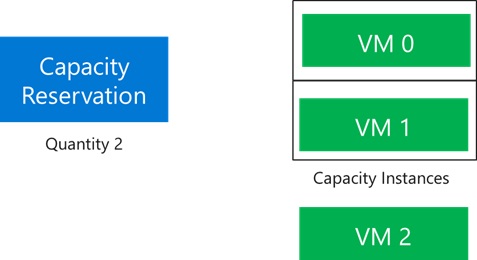
Use the CRG Instance View ($expand=instanceview) to track utilization and determine whether to right-size or overprovision reservations.
Monitoring and reporting
- Export Instance View data regularly to track allocated versus reserved quantities per member reservation.
- Correlate reservation usage with quota audits (for example,
az quota usage list --resource-provider Microsoft.Compute) to ensure reservation growth aligns with available regional quota.
Automation patterns
- Create/update reservations: Use the
Microsoft.Compute/capacityReservationGroupsREST API oraz resourcecommands within CI/CD pipelines to create CRGs and member reservations with declarative templates. - Associate workloads: Embed the
capacityReservationGroupproperty in ARM/Bicep templates or Terraform modules so deployments automatically consume the reservation when promoted to production. - Sharing automation: Script share assignments by calling the
shareaction with the desired consumer subscription list, ensuring idempotent operations during pipeline runs.
Operational checklist
- Validate required quota and inventory before reserving capacity for new regions or VM sizes.
- Review reservation utilization regularly; adjust quantities when buffers consistently remain unused or when overallocations persist.